> ## Documentation Index
> Fetch the complete documentation index at: https://openwearables.io/docs/llms.txt
> Use this file to discover all available pages before exploring further.
# Add a Wearable Provider Integration
> Add a new fitness data provider to Open Wearables. Covers Strategy, Factory, and Template Method patterns for OAuth, workout, and webhook handlers.
# How to Add a New Provider Integration
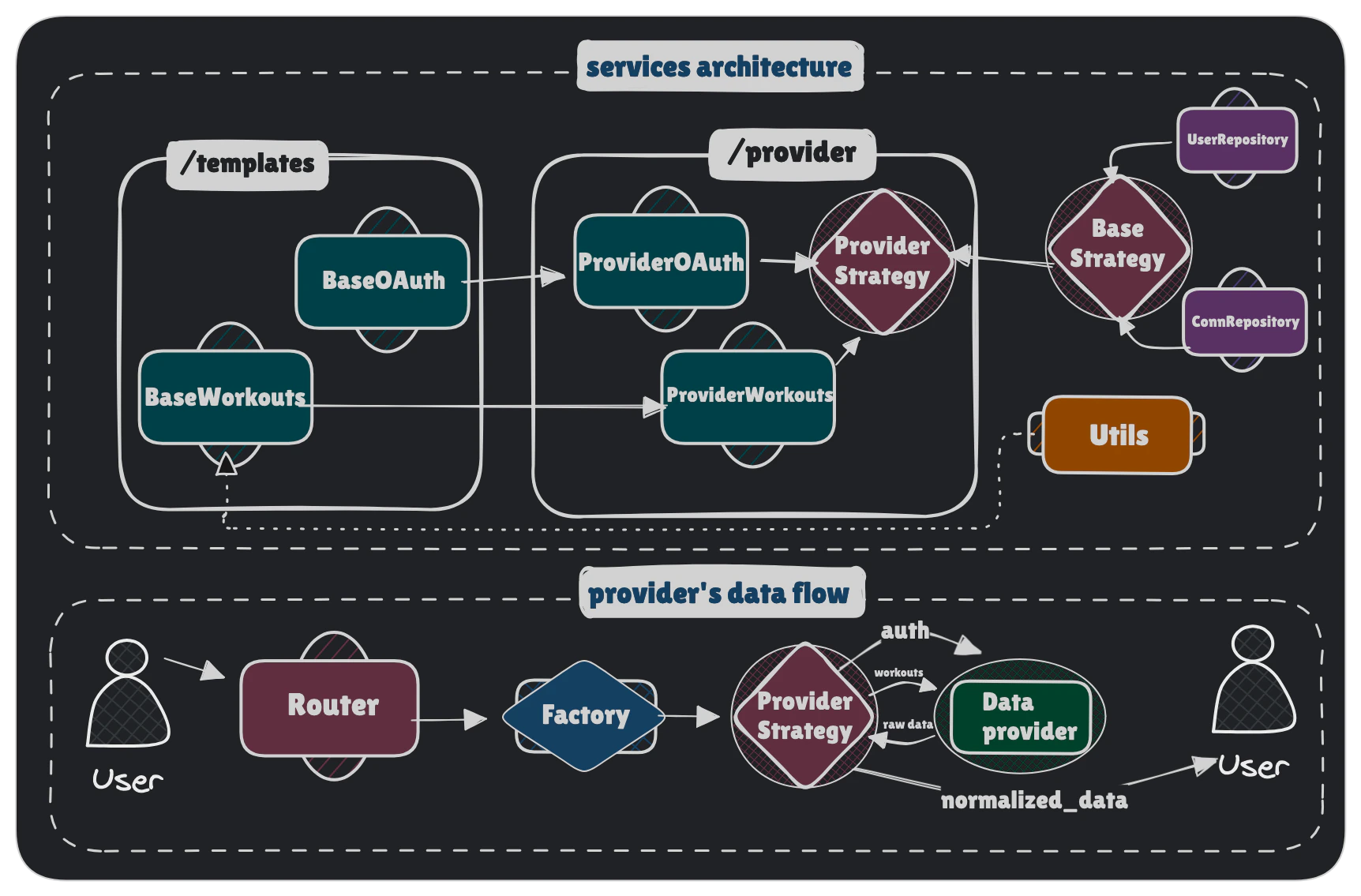
This guide walks you through the process of adding a new fitness data provider (e.g. Strava, Samsung Health, Xiaomi, WHOOP) to the OpenWearables platform. The architecture uses design patterns like **Strategy**, **Factory**, and **Template Method** to make adding new providers straightforward and consistent.
## Architecture Overview
Before diving into implementation, understand the main components:
1. **Strategy** - Defines the provider's identity, capabilities, and wires together all components
2. **Strategy Factory** - Central management of strategy instantiation (used by routes)
3. **OAuth Handler** - Manages authentication flow (if provider uses cloud API)
4. **Workouts Handler** - Fetches and normalizes workout/activity data
5. **247 Data Handler** - Fetches continuous health metrics (sleep, recovery, HR, etc.)
6. **Webhook Handler** - Receives and processes incoming push events from the provider
Each provider declares its data delivery modes via `ProviderCapabilities`:
| Capability | Description | Example providers |
| -------------------------- | ----------------------------------------------------------------------------------------------------------------------------------------------------------------------- | --------------------------- |
| `rest_pull` | Usually historical REST API | Oura, Whoop, Strava, Suunto |
| `client_sdk` | Data delivered via mobile SDK client | Apple, Samsung, Google |
| `file_import` | File-based data import | Apple Health |
| `webhook_callback` | Provider-initiates async export delivered to our webhook | Garmin backfill |
| `webhook_stream` | Provider pushes full data payload in every webhook | Garmin, Suunto |
| `webhook_ping` | Provider sends a lightweight notification; actual data must be fetched via REST | Oura, Strava, Fitbit, Polar |
| `webhook_registration_api` | Provider exposes an API to programmatically register webhook subscriptions. When `False`, subscriptions must be configured manually in the provider's developer portal. | Oura |
`webhook_stream` and `webhook_ping` are mutually exclusive. Use `webhook_stream` when the provider embeds the complete record in the webhook body (Garmin, Suunto). Use `webhook_ping` when the webhook is only a trigger and you must call the REST API to retrieve the actual data (Oura, Strava, Fitbit, Polar).
 ***
## Prerequisites
Before starting, gather the following information about your provider:
* Base API URL (e.g. `https://cloudapi.suunto.com`)
* Authentication method (usually OAuth 2.0)
* Available data endpoints (activities, workouts, health metrics)
* Rate limits and pagination
* Authorization URL
* Token exchange URL
* Required scopes
* PKCE required (yes/no)
* Credentials being sent via `Authorization` header or request body
* Client credentials (ID and Secret)
* Where redirect URL should be registered
* Workout/activity data structure
* Timestamp format (Unix, ISO 8601, etc.)
* Available metrics (heart rate, distance, calories, etc.)
* Workout type mappings
Please, remember to provide `svg` icon for a new provider. It should be named `.svg` and be placed in `/backend/app/static/provider-icons`.
***
## Step 1: Create Provider Directory Structure
Create a new directory for your provider in `backend/app/services/providers/`.
For a provider named **Suunto**, create:
```bash theme={null}
backend/app/services/providers/suunto/
├── __init__.py
├── strategy.py # Provider strategy + capabilities + coverage declaration
├── coverage.py # Declares what data the provider emits (single source of truth)
├── oauth.py # OAuth handler (skip if PUSH-only with no REST API)
├── workouts.py # Workout/activity data handler
├── data_247.py # 24/7 continuous health data (optional)
└── webhook_handler.py # Incoming webhook handler (optional, if webhook_stream or webhook_ping)
```
Use lowercase for the provider name in directory and file names to maintain consistency with existing providers.
***
## Step 2: Implement the Strategy Class
The strategy class is the entry point for your provider. It defines the provider's identity, declares its **capabilities**, and initializes its components.
Create `backend/app/services/providers/suunto/strategy.py`:
```python theme={null}
from app.services.providers.base_strategy import BaseProviderStrategy, ProviderCapabilities, ProviderCoverage
from app.services.providers.suunto.coverage import HEALTH_SCORES, SLEEP_FIELDS, TIMESERIES, WORKOUT_FIELDS
from app.services.providers.suunto.oauth import SuuntoOAuth
from app.services.providers.suunto.workouts import SuuntoWorkouts
class SuuntoStrategy(BaseProviderStrategy):
"""Suunto provider implementation."""
def __init__(self):
super().__init__()
# Initialize OAuth component (skip for SDK/XML-only providers)
self.oauth = SuuntoOAuth(
user_repo=self.user_repo,
connection_repo=self.connection_repo,
provider_name=self.name,
api_base_url=self.api_base_url,
)
# Initialize workouts component
self.workouts = SuuntoWorkouts(
workout_repo=self.workout_repo,
connection_repo=self.connection_repo,
provider_name=self.name,
api_base_url=self.api_base_url,
oauth=self.oauth,
)
# Webhook handler — only set if webhook_stream or webhook_ping (see below)
# self.webhooks = SuuntoWebhookHandler(...)
@property
def name(self) -> str:
"""Unique identifier for the provider (lowercase)."""
return "suunto"
@property
def api_base_url(self) -> str:
"""Base URL for the provider's API."""
return "https://cloudapi.suunto.com"
@property
def capabilities(self) -> ProviderCapabilities:
"""Declare what data delivery modes this provider supports."""
return ProviderCapabilities(
rest_pull=True,
webhook_stream=True, # Suunto delivers full payload in every webhook
)
@property
def coverage(self) -> ProviderCoverage:
"""Declare what data this provider emits (powers /api/v1/meta/coverage)."""
return ProviderCoverage(
timeseries=TIMESERIES,
workout_fields=WORKOUT_FIELDS,
sleep_fields=SLEEP_FIELDS,
health_scores=HEALTH_SCORES,
)
```
### Key Points:
* `name`: Must be unique and lowercase (used in URLs and database)
* `api_base_url`: Used by the API client to construct requests
* `display_name`: Optional, shown in UI (defaults to `name.capitalize()`)
* `capabilities`: **Required** — tells the unified router and sync scheduler how this provider delivers data
* `coverage`: declares what data the provider emits; pass through all four constants from `coverage.py` (see below)
* Set `self.webhooks = None` (default) if your provider has no incoming webhooks
* Set `self.oauth = None` for SDK/file-upload-only providers like Apple Health
***
## Prerequisites
Before starting, gather the following information about your provider:
* Base API URL (e.g. `https://cloudapi.suunto.com`)
* Authentication method (usually OAuth 2.0)
* Available data endpoints (activities, workouts, health metrics)
* Rate limits and pagination
* Authorization URL
* Token exchange URL
* Required scopes
* PKCE required (yes/no)
* Credentials being sent via `Authorization` header or request body
* Client credentials (ID and Secret)
* Where redirect URL should be registered
* Workout/activity data structure
* Timestamp format (Unix, ISO 8601, etc.)
* Available metrics (heart rate, distance, calories, etc.)
* Workout type mappings
Please, remember to provide `svg` icon for a new provider. It should be named `.svg` and be placed in `/backend/app/static/provider-icons`.
***
## Step 1: Create Provider Directory Structure
Create a new directory for your provider in `backend/app/services/providers/`.
For a provider named **Suunto**, create:
```bash theme={null}
backend/app/services/providers/suunto/
├── __init__.py
├── strategy.py # Provider strategy + capabilities + coverage declaration
├── coverage.py # Declares what data the provider emits (single source of truth)
├── oauth.py # OAuth handler (skip if PUSH-only with no REST API)
├── workouts.py # Workout/activity data handler
├── data_247.py # 24/7 continuous health data (optional)
└── webhook_handler.py # Incoming webhook handler (optional, if webhook_stream or webhook_ping)
```
Use lowercase for the provider name in directory and file names to maintain consistency with existing providers.
***
## Step 2: Implement the Strategy Class
The strategy class is the entry point for your provider. It defines the provider's identity, declares its **capabilities**, and initializes its components.
Create `backend/app/services/providers/suunto/strategy.py`:
```python theme={null}
from app.services.providers.base_strategy import BaseProviderStrategy, ProviderCapabilities, ProviderCoverage
from app.services.providers.suunto.coverage import HEALTH_SCORES, SLEEP_FIELDS, TIMESERIES, WORKOUT_FIELDS
from app.services.providers.suunto.oauth import SuuntoOAuth
from app.services.providers.suunto.workouts import SuuntoWorkouts
class SuuntoStrategy(BaseProviderStrategy):
"""Suunto provider implementation."""
def __init__(self):
super().__init__()
# Initialize OAuth component (skip for SDK/XML-only providers)
self.oauth = SuuntoOAuth(
user_repo=self.user_repo,
connection_repo=self.connection_repo,
provider_name=self.name,
api_base_url=self.api_base_url,
)
# Initialize workouts component
self.workouts = SuuntoWorkouts(
workout_repo=self.workout_repo,
connection_repo=self.connection_repo,
provider_name=self.name,
api_base_url=self.api_base_url,
oauth=self.oauth,
)
# Webhook handler — only set if webhook_stream or webhook_ping (see below)
# self.webhooks = SuuntoWebhookHandler(...)
@property
def name(self) -> str:
"""Unique identifier for the provider (lowercase)."""
return "suunto"
@property
def api_base_url(self) -> str:
"""Base URL for the provider's API."""
return "https://cloudapi.suunto.com"
@property
def capabilities(self) -> ProviderCapabilities:
"""Declare what data delivery modes this provider supports."""
return ProviderCapabilities(
rest_pull=True,
webhook_stream=True, # Suunto delivers full payload in every webhook
)
@property
def coverage(self) -> ProviderCoverage:
"""Declare what data this provider emits (powers /api/v1/meta/coverage)."""
return ProviderCoverage(
timeseries=TIMESERIES,
workout_fields=WORKOUT_FIELDS,
sleep_fields=SLEEP_FIELDS,
health_scores=HEALTH_SCORES,
)
```
### Key Points:
* `name`: Must be unique and lowercase (used in URLs and database)
* `api_base_url`: Used by the API client to construct requests
* `display_name`: Optional, shown in UI (defaults to `name.capitalize()`)
* `capabilities`: **Required** — tells the unified router and sync scheduler how this provider delivers data
* `coverage`: declares what data the provider emits; pass through all four constants from `coverage.py` (see below)
* Set `self.webhooks = None` (default) if your provider has no incoming webhooks
* Set `self.oauth = None` for SDK/file-upload-only providers like Apple Health
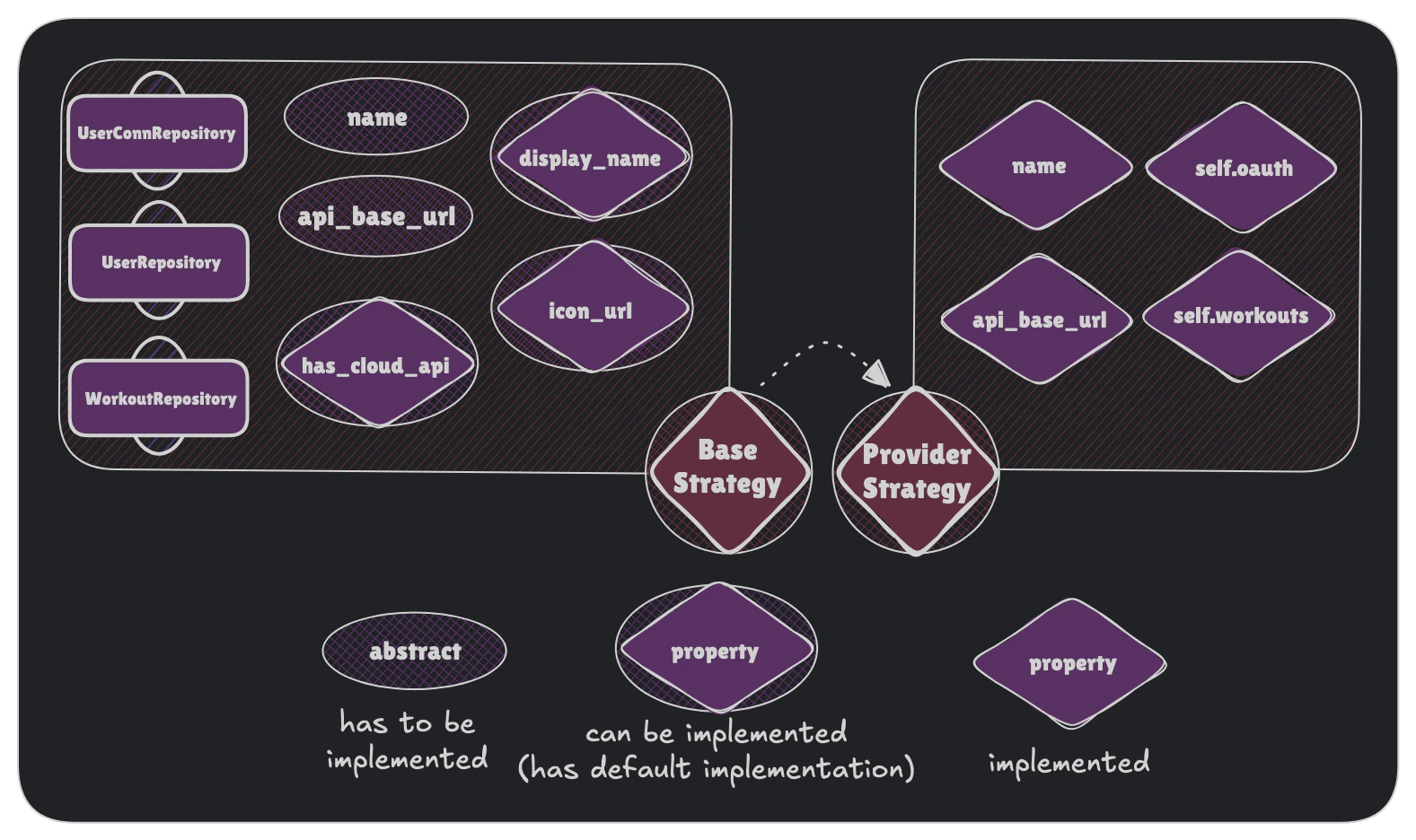 Inherited `BaseProviderStrategy` will init all required repositories so you don't need to take care about database manipulations. You can read more about repositories role in our [System Overview](/architecture/system-overview).
***
### Declare data coverage (`coverage.py`)
`coverage.py` is the single source of truth for what your provider emits. It powers the public [`GET /api/v1/meta/coverage`](/api-reference) endpoint and the Data Coverage matrix, and the `coverage` property above reads from it.
Create `backend/app/services/providers/suunto/coverage.py`:
```python theme={null}
from app.schemas.enums import SeriesType
from app.schemas.enums.health_score_category import HealthScoreCategory
# Mapping tables (handler key → SeriesType) are imported and used directly by
# data_247.py / workouts.py, so TIMESERIES is derived from them and never drifts.
ACTIVITY_SERIES: dict[str, SeriesType] = {
"steps": SeriesType.steps,
"energy": SeriesType.energy,
}
TIMESERIES: frozenset[SeriesType] = frozenset(
{
*ACTIVITY_SERIES.values(), # /v1/activity
SeriesType.resting_heart_rate, # single inline emission
}
)
# EventRecordDetail fields your handlers populate
WORKOUT_FIELDS: frozenset[str] = frozenset({"energy_burned", "distance", "moving_time_seconds"})
SLEEP_FIELDS: frozenset[str] = frozenset({"sleep_total_duration_minutes", "sleep_deep_minutes"})
HEALTH_SCORES: frozenset[HealthScoreCategory] = frozenset({HealthScoreCategory.RECOVERY})
```
Rules:
* Move any `key → SeriesType` mapping that lives in `data_247.py`/`workouts.py` into `coverage.py` and import it back, so the mapping is defined once and `TIMESERIES` is derived from it.
* Single inline `series_type=SeriesType.X` emissions may stay in the handler, but `X` must appear in `TIMESERIES`.
* Declare all four constants; use `frozenset()` for layers your provider doesn't emit (e.g. a workouts-only provider has an empty `TIMESERIES`).
A guard test scans your implementation and **fails** if it emits a `SeriesType` or sets an `EventRecordDetail` field not declared here — and asserts the strategy's `coverage` property exposes all four constants:
```bash theme={null}
cd backend && uv run pytest tests/providers/test_provider_coverage.py -k suunto -q
```
```
4 passed in 0.42s
```
***
## Step 3: Implement OAuth Handler (PULL providers)
If your provider uses OAuth 2.0 for authentication, implement the OAuth handler.
Create `backend/app/services/providers/suunto/oauth.py`:
```python theme={null}
import httpx
from app.config import settings
from app.schemas import (
AuthenticationMethod,
OAuthTokenResponse,
ProviderCredentials,
ProviderEndpoints,
)
from app.services.providers.templates.base_oauth import BaseOAuthTemplate
class SuuntoOAuth(BaseOAuthTemplate):
"""Suunto OAuth 2.0 implementation."""
@property
def endpoints(self) -> ProviderEndpoints:
"""OAuth endpoints for authorization and token exchange."""
return ProviderEndpoints(
authorize_url="https://cloudapi-oauth.suunto.com/oauth/authorize",
token_url="https://cloudapi-oauth.suunto.com/oauth/token",
)
@property
def credentials(self) -> ProviderCredentials:
"""OAuth credentials from environment variables."""
return ProviderCredentials(
client_id=settings.suunto_client_id or "",
client_secret=(settings.suunto_client_secret.get_secret_value() if settings.suunto_client_secret else ""),
redirect_uri=settings.suunto_redirect_uri,
default_scope=settings.suunto_default_scope,
subscription_key=(
settings.suunto_subscription_key.get_secret_value() if settings.suunto_subscription_key else ""
),
)
# OAuth configuration
use_pkce: bool = False # Set True if provider requires PKCE
auth_method: AuthenticationMethod = AuthenticationMethod.BASIC_AUTH # or BODY
def _get_provider_user_info(
self,
token_response: OAuthTokenResponse,
user_id: str
) -> dict[str, str | None]:
# implement your method here
pass
```
Here you can also create all provider-specific methods, like `_register_user` in Polar's case.
### Configuration Options:
Set to `True` if provider requires PKCE (Proof Key for Code Exchange). Garmin enforces PKCE, Polar and Suunto don't.
* `BASIC_AUTH`: Credentials in Authorization header (Polar, Suunto)
* `BODY`: Credentials in request body (Garmin)
### Add Environment Variables:
Add your OAuth credentials to `.env`:
```bash theme={null}
SUUNTO_CLIENT_ID=your_client_id
SUUNTO_CLIENT_SECRET=your_client_secret
SUUNTO_REDIRECT_URI=https://yourdomain.com/api/v1/oauth/suunto/callback
SUUNTO_DEFAULT_SCOPE=activity:read_all
```
And update `backend/app/config.py`:
```python theme={null}
class Settings(BaseSettings):
# ... existing settings ...
# Suunto OAuth
suunto_client_id: str | None = None
suunto_client_secret: SecretStr | None = None
suunto_redirect_uri: str = "http://localhost:8000/api/v1/oauth/suunto/callback"
suunto_default_scope: str = "activity:read_all"
```
***
## Step 4: Implement Workouts Handler
The workouts handler fetches and normalizes workout data from the provider's API.
Create `backend/app/services/providers/suunto/workouts.py`:
```python theme={null}
from datetime import datetime
from decimal import Decimal
from typing import Any
from uuid import UUID, uuid4
from app.database import DbSession
from app.schemas import EventRecordCreate, EventRecordDetailCreate, EventRecordMetrics
from app.services.providers.templates.base_workouts import BaseWorkoutsTemplate
class SuuntoWorkouts(BaseWorkoutsTemplate):
"""Suunto workouts implementation."""
def _extract_dates(self, start_timestamp: int, end_timestamp: int) -> tuple[datetime, datetime]:
"""Extract start and end dates from timestamps."""
start_date = datetime.fromtimestamp(start_timestamp / 1000)
end_date = datetime.fromtimestamp(end_timestamp / 1000)
return start_date, end_date
def _build_metrics(self, raw_workout: SuuntoWorkoutJSON) -> EventRecordMetrics:
hr_data = ...
heart_rate_avg = ...
heart_rate_max = ...
steps_count = ...
steps_avg = ...
return {
"heart_rate_min": ...
"heart_rate_max": ...
"heart_rate_avg": heart_rate_avg,
"steps_min": steps_count,
"steps_max": steps_count,
"steps_avg": steps_avg,
"steps_total": steps_count,
}
def _normalize_workout(
self,
raw_workout: SuuntoWorkoutJSON,
user_id: UUID,
) -> tuple[EventRecordCreate, EventRecordDetailCreate]:
"""Normalize Suunto workout to EventRecordCreate."""
workout_id = uuid4()
workout_type = get_unified_workout_type(raw_workout.activityId)
start_date, end_date = self._extract_dates(raw_workout.startTime, raw_workout.stopTime)
duration_seconds = int(raw_workout.totalTime)
source_name = ...
device_id = ...
metrics = self._build_metrics(raw_workout)
workout_create = EventRecordCreate(
category="workout",
type=workout_type.value,
source_name=source_name,
device_id=device_id,
duration_seconds=duration_seconds,
start_datetime=start_date,
end_datetime=end_date,
id=workout_id,
provider_id=str(raw_workout.workoutId),
user_id=user_id,
)
workout_detail_create = EventRecordDetailCreate(
record_id=workout_id,
**metrics,
)
return workout_create, workout_detail_create
def _build_bundles(
self,
raw: list[SuuntoWorkoutJSON],
user_id: UUID,
) -> Iterable[tuple[EventRecordCreate, EventRecordDetailCreate]]:
"""Build event record payloads for Suunto workouts."""
for raw_workout in raw:
record, details = self._normalize_workout(raw_workout, user_id)
yield record, details
def load_data(
self,
db: DbSession,
user_id: UUID,
**kwargs: Any,
) -> bool:
"""Load data from Suunto API."""
response = self.get_workouts_from_api(db, user_id, **kwargs)
workouts_data = response.get("payload", [])
workouts = [SuuntoWorkoutJSON(**w) for w in workouts_data]
for record, details in self._build_bundles(workouts, user_id):
event_record_service.create(db, record)
event_record_service.create_detail(db, details)
return True
```
### Key Methods to Implement:
**Most important!** Convert provider's data format to OpenWearables [unified schema](/architecture/unified-data-model).
Handle provider-specific timestamp formats (Unix, ISO 8601, custom strings)
Creates statistics for Workout.
Optimize query by bundling workout records into packages.
Main sync method that orchestrates fetching and saving data
There are also utils modules, like `app/backend/services/providers/api_client.py`, which provides utilities for making oauth api requests.
***
## Step 5: Create Workout Type Mapping
Create a mapping file to convert provider-specific workout types to unified types.
Create `backend/app/constants/workout_types/suunto.py`:
```python theme={null}
"""Suunto activity type to OpenWearables unified workout type mapping."""
from app.schemas.workout_types import WorkoutType
SUUNTO_WORKOUT_TYPE_MAPPINGS: list[tuple[int, str, WorkoutType]] = [
(0, "Walking", WorkoutType.WALKING),
(1, "Running", WorkoutType.RUNNING),
(2, "Cycling", WorkoutType.CYCLING),
# [...]
}
SUUNTO_ID_TO_UNIFIED: dict[int, WorkoutType] = {
activity_id: unified_type for activity_id, _, unified_type in SUUNTO_WORKOUT_TYPE_MAPPINGS
}
SUUNTO_ID_TO_NAME: dict[int, str] = {activity_id: name for activity_id, name, _ in SUUNTO_WORKOUT_TYPE_MAPPINGS}
def get_unified_workout_type(suunto_activity_id: int) -> WorkoutType:
return SUUNTO_ID_TO_UNIFIED.get(suunto_activity_id, WorkoutType.OTHER)
def get_activity_name(suunto_activity_id: int) -> str:
"""Get the Suunto activity name for a given ID."""
return SUUNTO_ID_TO_NAME.get(suunto_activity_id, "Unknown")
```
Review the existing unified workout types in your system before mapping. You may need to add new unified types to accommodate provider-specific activities.
***
## Step 6: Register Provider in Factory
Add your new provider to the factory so it can be instantiated by the system.
Edit `backend/app/services/providers/factory.py`:
```python theme={null}
from app.services.providers.apple.strategy import AppleStrategy
from app.services.providers.base_strategy import BaseProviderStrategy
from app.services.providers.garmin.strategy import GarminStrategy
from app.services.providers.polar.strategy import PolarStrategy
from app.services.providers.suunto.strategy import SuuntoStrategy
class ProviderFactory:
"""Factory for creating provider instances."""
def get_provider(self, provider_name: str) -> BaseProviderStrategy:
match provider_name:
case "apple":
return AppleStrategy()
case "garmin":
return GarminStrategy()
case "suunto":
return SuuntoStrategy()
case "polar":
return PolarStrategy()
case _:
raise ValueError(f"Unknown provider: {provider_name}")
```
Factory will be used by routes endpoints to fetch correct strategy.
***
## Step 7: Add Provider to Schema Enums
Update the `ProviderName` enum to include your new provider.
Edit `backend/app/schemas/oauth.py`:
```python theme={null}
from enum import Enum
class ProviderName(str, Enum):
"""Supported fitness data providers."""
APPLE = "apple"
GARMIN = "garmin"
POLAR = "polar"
SUUNTO = "suunto"
```
This enables:
* Type validation in API endpoints
* Auto-generated API documentation with provider options
* Enum-based routing
***
## Step 8: Test Your Integration
Now test your implementation with these steps:
### 1. Test OAuth Flow (if applicable)
```bash Start OAuth theme={null}
curl -X GET "http://localhost:8000/api/v1/oauth/suunto/authorize?user_id=YOUR_USER_ID"
```
```json Response theme={null}
{
"authorization_url": "https://cloudapi-oauth.suunto.com/oauth/authorize?response_type=code&client_id=...",
"state": "random_state_string"
}
```
Visit the authorization URL in your browser, authorize, and verify the callback works.
### 2. Test Data Sync
```bash Sync Workouts theme={null}
curl -X POST "http://localhost:8000/api/v1/sync/suunto/users/YOUR_USER_ID/sync" \
-H "X-API-Key: YOUR_API_KEY" \
-H "Content-Type: application/json"
```
```json Response theme={null}
{
"success": true
}
```
### 3. Verify Database
Check that workouts are saved correctly:
```sql theme={null}
SELECT * FROM event_records
WHERE user_id = 'YOUR_USER_ID'
AND provider_id IS NOT NULL
ORDER BY created_at DESC
LIMIT 10;
```
### 4. Check Logs
Monitor logs for errors:
```bash theme={null}
# Backend logs
docker-compose logs -f backend
# Or if running locally
tail -f logs/app.log
```
***
## Step 9 (Optional): Implement Webhook Handler (PUSH flow)
If your provider delivers data via incoming webhooks, implement a `BaseWebhookHandler` subclass and wire it into your strategy.
The unified router at `POST /api/v1/providers/{provider}/webhooks` automatically delegates all requests to `strategy.webhooks` — no new routes needed.
### Understand the delivery mode
First decide how your provider delivers webhook data:
Provider sends the complete data in the webhook body. `dispatch()` saves records directly.
**Example: Garmin**
Provider sends a lightweight notification with user ID + event type. You must fetch actual data via REST inside `dispatch()`.
**Example: Oura, Strava, Fitbit**
Reflect this in `capabilities` inside your strategy:
```python theme={null}
# Full-payload stream (Garmin/Suunto-style) — historical pull + live webhook stream
return ProviderCapabilities(rest_pull=True, webhook_stream=True)
# Notify-only ping (Oura/Strava-style) — REST pull + webhook triggers refetch
return ProviderCapabilities(rest_pull=True, webhook_ping=True)
# REST-only — no webhooks
return ProviderCapabilities(rest_pull=True)
```
### Create the webhook handler
Create `backend/app/services/providers/suunto/webhook_handler.py`:
```python theme={null}
from typing import Any
from fastapi import HTTPException, Request
from app.config import settings
from app.database import DbSession
from app.services.providers.templates.base_webhook_handler import BaseWebhookHandler
class SuuntoWebhookHandler(BaseWebhookHandler):
"""Webhook handler for Suunto push events."""
def __init__(self):
super().__init__("suunto")
def verify_signature(self, request: Request, body: bytes) -> bool:
"""Verify the incoming request is authentically from the provider.
Use the appropriate scheme for your provider:
- HMAC-SHA256: use self._verify_hmac_sha256(secret, body, provided_sig)
- Plain token: use self._verify_token(expected, provided)
- Header check: inspect request.headers directly
"""
sig = request.headers.get("x-hmac-sha256-signature", "")
secret = settings.suunto_webhook_secret.get_secret_value() if settings.suunto_webhook_secret else ""
return self._verify_hmac_sha256(secret, body, sig)
def parse_payload(self, body: bytes) -> dict[str, Any]:
"""Parse the raw webhook body into a Python dict / Pydantic model."""
import json
try:
return json.loads(body)
except (json.JSONDecodeError, ValueError) as exc:
raise HTTPException(status_code=400, detail="Invalid JSON body") from exc
def dispatch(self, db: DbSession, payload: dict[str, Any]) -> dict[str, Any]:
"""Route the payload to the appropriate service method.
For webhook_stream (full-payload): save records directly or enqueue a Celery task.
For webhook_ping (notify-only): fetch actual data via REST then save.
"""
event_type = payload.get("type", "unknown")
# Enqueue async processing so we respond within the provider's timeout window
# process_push.delay(payload, request_trace_id=...)
return {"status": "accepted", "event_type": event_type}
def supported_event_types(self) -> list[str]:
return ["WORKOUT_CREATED"]
def handle_challenge(self, request: Request) -> dict[str, Any]:
"""Handle GET-based subscription verification (if your provider requires it).
Override only if your provider uses a GET challenge/response handshake
(like Strava hub.challenge or Oura verification_token).
Default raises 501.
"""
token = request.query_params.get("hub.challenge", "")
return {"hub.challenge": token}
```
`BaseWebhookHandler` provides two signature-verification helpers so you never reimplement cryptographic primitives:
* `_verify_hmac_sha256(secret, body, provided_signature)` — for HMAC-SHA256 providers (Oura, Fitbit)
* `_verify_token(expected, provided)` — for plain shared-secret header/query-param verification
### Wire the handler into your strategy
```python theme={null}
# In suunto/strategy.py
from app.services.providers.suunto.webhook_handler import SuuntoWebhookHandler
class SuuntoStrategy(BaseProviderStrategy):
def __init__(self):
super().__init__()
# ... other components ...
self.webhooks = SuuntoWebhookHandler()
@property
def capabilities(self) -> ProviderCapabilities:
return ProviderCapabilities(
rest_pull=True,
webhook_stream=True,
)
```
That's all — no new route files needed. The unified router at `/api/v1/providers/suunto/webhooks` will route all POST and GET requests to your handler automatically.
`GET /api/v1/providers/{provider}/webhooks` → `strategy.webhooks.handle_challenge(request)`\
`POST /api/v1/providers/{provider}/webhooks` → `strategy.webhooks.handle(request, body, db)`
### Automatic webhook registration (optional)
Some providers expose an API to register webhook subscriptions programmatically (e.g. Oura). For these, you can have subscriptions registered automatically whenever an admin switches the provider's live sync mode to `webhook` — no manual setup in the developer portal required.
To enable this:
1. Set `webhook_registration_api=True` in your strategy's `ProviderCapabilities`.
2. Override `register_webhooks(callback_url)` in your strategy to call your provider's subscription registration API. It should be idempotent — skip existing subscriptions, create missing ones.
```python theme={null}
class MyProviderStrategy(BaseProviderStrategy):
@property
def capabilities(self) -> ProviderCapabilities:
return ProviderCapabilities(
rest_pull=True,
webhook_ping=True,
webhook_registration_api=True,
)
async def register_webhooks(self, callback_url: str) -> Any:
return await my_provider_webhook_service.register_subscriptions(callback_url)
```
When an admin switches the sync mode to `webhook` via `PUT /api/v1/oauth/providers/{provider}`, the platform automatically dispatches a Celery task (`register_provider_webhooks`) that calls `strategy.register_webhooks(callback_url)` in the background. The callback URL is derived from `API_BASE_URL`: `{API_BASE_URL}/api/v1/providers/{provider}/webhooks`.
If `webhook_registration_api=False` (the default), switching sync mode to `webhook` only updates the database — you must register subscriptions manually in the provider's developer portal pointing to `{API_BASE_URL}/api/v1/providers/{provider}/webhooks`.
***
## Troubleshooting
Add detailed logging in `_normalize_workout` to inspect raw data structure. Compare against provider's API documentation.
Implement duplicate detection in `_save_workout` based on `provider_id`. Check if workout with same `provider_id` already exists.
Add missing types to your mapping file. Consider adding a fallback type ("other") and logging unmapped types for future updates.
***
## Summary Checklist
Use this checklist to ensure you've completed all steps:
* [ ] Created provider directory structure (`strategy.py`, `oauth.py`, `workouts.py`)
* [ ] Implemented `ProviderStrategy` with required properties and **`capabilities`** declaration
* [ ] Implemented `ProviderOAuth` with endpoints, credentials, and user info fetch
* [ ] Implemented `ProviderWorkouts` with normalization logic
* [ ] Implemented `ProviderWebhookHandler` extending `BaseWebhookHandler` (if `webhook_stream` or `webhook_ping`)
* [ ] Wired `self.webhooks` in strategy (or left as `None` if no webhooks)
* [ ] Created workout type mapping file
* [ ] Registered provider in `ProviderFactory`
* [ ] Added provider to `ProviderName` enum
* [ ] Added provider icon to static assets
* [ ] Added environment variables to `.env` and `config.py`
* [ ] Tested OAuth flow end-to-end
* [ ] Tested data synchronization
* [ ] Verified data in database
* [ ] Tested webhook delivery at `POST /api/v1/providers/{provider}/webhooks` (if applicable)
* [ ] Tested subscription verification at `GET /api/v1/providers/{provider}/webhooks` (if applicable)
* [ ] If `webhook_registration_api=True`: implemented `register_webhooks()` in strategy and verified auto-registration fires on sync mode switch
* [ ] Added error handling and logging
* [ ] Updated API documentation
Congratulations! You've successfully integrated a new provider into OpenWearables. 🎉
Inherited `BaseProviderStrategy` will init all required repositories so you don't need to take care about database manipulations. You can read more about repositories role in our [System Overview](/architecture/system-overview).
***
### Declare data coverage (`coverage.py`)
`coverage.py` is the single source of truth for what your provider emits. It powers the public [`GET /api/v1/meta/coverage`](/api-reference) endpoint and the Data Coverage matrix, and the `coverage` property above reads from it.
Create `backend/app/services/providers/suunto/coverage.py`:
```python theme={null}
from app.schemas.enums import SeriesType
from app.schemas.enums.health_score_category import HealthScoreCategory
# Mapping tables (handler key → SeriesType) are imported and used directly by
# data_247.py / workouts.py, so TIMESERIES is derived from them and never drifts.
ACTIVITY_SERIES: dict[str, SeriesType] = {
"steps": SeriesType.steps,
"energy": SeriesType.energy,
}
TIMESERIES: frozenset[SeriesType] = frozenset(
{
*ACTIVITY_SERIES.values(), # /v1/activity
SeriesType.resting_heart_rate, # single inline emission
}
)
# EventRecordDetail fields your handlers populate
WORKOUT_FIELDS: frozenset[str] = frozenset({"energy_burned", "distance", "moving_time_seconds"})
SLEEP_FIELDS: frozenset[str] = frozenset({"sleep_total_duration_minutes", "sleep_deep_minutes"})
HEALTH_SCORES: frozenset[HealthScoreCategory] = frozenset({HealthScoreCategory.RECOVERY})
```
Rules:
* Move any `key → SeriesType` mapping that lives in `data_247.py`/`workouts.py` into `coverage.py` and import it back, so the mapping is defined once and `TIMESERIES` is derived from it.
* Single inline `series_type=SeriesType.X` emissions may stay in the handler, but `X` must appear in `TIMESERIES`.
* Declare all four constants; use `frozenset()` for layers your provider doesn't emit (e.g. a workouts-only provider has an empty `TIMESERIES`).
A guard test scans your implementation and **fails** if it emits a `SeriesType` or sets an `EventRecordDetail` field not declared here — and asserts the strategy's `coverage` property exposes all four constants:
```bash theme={null}
cd backend && uv run pytest tests/providers/test_provider_coverage.py -k suunto -q
```
```
4 passed in 0.42s
```
***
## Step 3: Implement OAuth Handler (PULL providers)
If your provider uses OAuth 2.0 for authentication, implement the OAuth handler.
Create `backend/app/services/providers/suunto/oauth.py`:
```python theme={null}
import httpx
from app.config import settings
from app.schemas import (
AuthenticationMethod,
OAuthTokenResponse,
ProviderCredentials,
ProviderEndpoints,
)
from app.services.providers.templates.base_oauth import BaseOAuthTemplate
class SuuntoOAuth(BaseOAuthTemplate):
"""Suunto OAuth 2.0 implementation."""
@property
def endpoints(self) -> ProviderEndpoints:
"""OAuth endpoints for authorization and token exchange."""
return ProviderEndpoints(
authorize_url="https://cloudapi-oauth.suunto.com/oauth/authorize",
token_url="https://cloudapi-oauth.suunto.com/oauth/token",
)
@property
def credentials(self) -> ProviderCredentials:
"""OAuth credentials from environment variables."""
return ProviderCredentials(
client_id=settings.suunto_client_id or "",
client_secret=(settings.suunto_client_secret.get_secret_value() if settings.suunto_client_secret else ""),
redirect_uri=settings.suunto_redirect_uri,
default_scope=settings.suunto_default_scope,
subscription_key=(
settings.suunto_subscription_key.get_secret_value() if settings.suunto_subscription_key else ""
),
)
# OAuth configuration
use_pkce: bool = False # Set True if provider requires PKCE
auth_method: AuthenticationMethod = AuthenticationMethod.BASIC_AUTH # or BODY
def _get_provider_user_info(
self,
token_response: OAuthTokenResponse,
user_id: str
) -> dict[str, str | None]:
# implement your method here
pass
```
Here you can also create all provider-specific methods, like `_register_user` in Polar's case.
### Configuration Options:
Set to `True` if provider requires PKCE (Proof Key for Code Exchange). Garmin enforces PKCE, Polar and Suunto don't.
* `BASIC_AUTH`: Credentials in Authorization header (Polar, Suunto)
* `BODY`: Credentials in request body (Garmin)
### Add Environment Variables:
Add your OAuth credentials to `.env`:
```bash theme={null}
SUUNTO_CLIENT_ID=your_client_id
SUUNTO_CLIENT_SECRET=your_client_secret
SUUNTO_REDIRECT_URI=https://yourdomain.com/api/v1/oauth/suunto/callback
SUUNTO_DEFAULT_SCOPE=activity:read_all
```
And update `backend/app/config.py`:
```python theme={null}
class Settings(BaseSettings):
# ... existing settings ...
# Suunto OAuth
suunto_client_id: str | None = None
suunto_client_secret: SecretStr | None = None
suunto_redirect_uri: str = "http://localhost:8000/api/v1/oauth/suunto/callback"
suunto_default_scope: str = "activity:read_all"
```
***
## Step 4: Implement Workouts Handler
The workouts handler fetches and normalizes workout data from the provider's API.
Create `backend/app/services/providers/suunto/workouts.py`:
```python theme={null}
from datetime import datetime
from decimal import Decimal
from typing import Any
from uuid import UUID, uuid4
from app.database import DbSession
from app.schemas import EventRecordCreate, EventRecordDetailCreate, EventRecordMetrics
from app.services.providers.templates.base_workouts import BaseWorkoutsTemplate
class SuuntoWorkouts(BaseWorkoutsTemplate):
"""Suunto workouts implementation."""
def _extract_dates(self, start_timestamp: int, end_timestamp: int) -> tuple[datetime, datetime]:
"""Extract start and end dates from timestamps."""
start_date = datetime.fromtimestamp(start_timestamp / 1000)
end_date = datetime.fromtimestamp(end_timestamp / 1000)
return start_date, end_date
def _build_metrics(self, raw_workout: SuuntoWorkoutJSON) -> EventRecordMetrics:
hr_data = ...
heart_rate_avg = ...
heart_rate_max = ...
steps_count = ...
steps_avg = ...
return {
"heart_rate_min": ...
"heart_rate_max": ...
"heart_rate_avg": heart_rate_avg,
"steps_min": steps_count,
"steps_max": steps_count,
"steps_avg": steps_avg,
"steps_total": steps_count,
}
def _normalize_workout(
self,
raw_workout: SuuntoWorkoutJSON,
user_id: UUID,
) -> tuple[EventRecordCreate, EventRecordDetailCreate]:
"""Normalize Suunto workout to EventRecordCreate."""
workout_id = uuid4()
workout_type = get_unified_workout_type(raw_workout.activityId)
start_date, end_date = self._extract_dates(raw_workout.startTime, raw_workout.stopTime)
duration_seconds = int(raw_workout.totalTime)
source_name = ...
device_id = ...
metrics = self._build_metrics(raw_workout)
workout_create = EventRecordCreate(
category="workout",
type=workout_type.value,
source_name=source_name,
device_id=device_id,
duration_seconds=duration_seconds,
start_datetime=start_date,
end_datetime=end_date,
id=workout_id,
provider_id=str(raw_workout.workoutId),
user_id=user_id,
)
workout_detail_create = EventRecordDetailCreate(
record_id=workout_id,
**metrics,
)
return workout_create, workout_detail_create
def _build_bundles(
self,
raw: list[SuuntoWorkoutJSON],
user_id: UUID,
) -> Iterable[tuple[EventRecordCreate, EventRecordDetailCreate]]:
"""Build event record payloads for Suunto workouts."""
for raw_workout in raw:
record, details = self._normalize_workout(raw_workout, user_id)
yield record, details
def load_data(
self,
db: DbSession,
user_id: UUID,
**kwargs: Any,
) -> bool:
"""Load data from Suunto API."""
response = self.get_workouts_from_api(db, user_id, **kwargs)
workouts_data = response.get("payload", [])
workouts = [SuuntoWorkoutJSON(**w) for w in workouts_data]
for record, details in self._build_bundles(workouts, user_id):
event_record_service.create(db, record)
event_record_service.create_detail(db, details)
return True
```
### Key Methods to Implement:
**Most important!** Convert provider's data format to OpenWearables [unified schema](/architecture/unified-data-model).
Handle provider-specific timestamp formats (Unix, ISO 8601, custom strings)
Creates statistics for Workout.
Optimize query by bundling workout records into packages.
Main sync method that orchestrates fetching and saving data
There are also utils modules, like `app/backend/services/providers/api_client.py`, which provides utilities for making oauth api requests.
***
## Step 5: Create Workout Type Mapping
Create a mapping file to convert provider-specific workout types to unified types.
Create `backend/app/constants/workout_types/suunto.py`:
```python theme={null}
"""Suunto activity type to OpenWearables unified workout type mapping."""
from app.schemas.workout_types import WorkoutType
SUUNTO_WORKOUT_TYPE_MAPPINGS: list[tuple[int, str, WorkoutType]] = [
(0, "Walking", WorkoutType.WALKING),
(1, "Running", WorkoutType.RUNNING),
(2, "Cycling", WorkoutType.CYCLING),
# [...]
}
SUUNTO_ID_TO_UNIFIED: dict[int, WorkoutType] = {
activity_id: unified_type for activity_id, _, unified_type in SUUNTO_WORKOUT_TYPE_MAPPINGS
}
SUUNTO_ID_TO_NAME: dict[int, str] = {activity_id: name for activity_id, name, _ in SUUNTO_WORKOUT_TYPE_MAPPINGS}
def get_unified_workout_type(suunto_activity_id: int) -> WorkoutType:
return SUUNTO_ID_TO_UNIFIED.get(suunto_activity_id, WorkoutType.OTHER)
def get_activity_name(suunto_activity_id: int) -> str:
"""Get the Suunto activity name for a given ID."""
return SUUNTO_ID_TO_NAME.get(suunto_activity_id, "Unknown")
```
Review the existing unified workout types in your system before mapping. You may need to add new unified types to accommodate provider-specific activities.
***
## Step 6: Register Provider in Factory
Add your new provider to the factory so it can be instantiated by the system.
Edit `backend/app/services/providers/factory.py`:
```python theme={null}
from app.services.providers.apple.strategy import AppleStrategy
from app.services.providers.base_strategy import BaseProviderStrategy
from app.services.providers.garmin.strategy import GarminStrategy
from app.services.providers.polar.strategy import PolarStrategy
from app.services.providers.suunto.strategy import SuuntoStrategy
class ProviderFactory:
"""Factory for creating provider instances."""
def get_provider(self, provider_name: str) -> BaseProviderStrategy:
match provider_name:
case "apple":
return AppleStrategy()
case "garmin":
return GarminStrategy()
case "suunto":
return SuuntoStrategy()
case "polar":
return PolarStrategy()
case _:
raise ValueError(f"Unknown provider: {provider_name}")
```
Factory will be used by routes endpoints to fetch correct strategy.
***
## Step 7: Add Provider to Schema Enums
Update the `ProviderName` enum to include your new provider.
Edit `backend/app/schemas/oauth.py`:
```python theme={null}
from enum import Enum
class ProviderName(str, Enum):
"""Supported fitness data providers."""
APPLE = "apple"
GARMIN = "garmin"
POLAR = "polar"
SUUNTO = "suunto"
```
This enables:
* Type validation in API endpoints
* Auto-generated API documentation with provider options
* Enum-based routing
***
## Step 8: Test Your Integration
Now test your implementation with these steps:
### 1. Test OAuth Flow (if applicable)
```bash Start OAuth theme={null}
curl -X GET "http://localhost:8000/api/v1/oauth/suunto/authorize?user_id=YOUR_USER_ID"
```
```json Response theme={null}
{
"authorization_url": "https://cloudapi-oauth.suunto.com/oauth/authorize?response_type=code&client_id=...",
"state": "random_state_string"
}
```
Visit the authorization URL in your browser, authorize, and verify the callback works.
### 2. Test Data Sync
```bash Sync Workouts theme={null}
curl -X POST "http://localhost:8000/api/v1/sync/suunto/users/YOUR_USER_ID/sync" \
-H "X-API-Key: YOUR_API_KEY" \
-H "Content-Type: application/json"
```
```json Response theme={null}
{
"success": true
}
```
### 3. Verify Database
Check that workouts are saved correctly:
```sql theme={null}
SELECT * FROM event_records
WHERE user_id = 'YOUR_USER_ID'
AND provider_id IS NOT NULL
ORDER BY created_at DESC
LIMIT 10;
```
### 4. Check Logs
Monitor logs for errors:
```bash theme={null}
# Backend logs
docker-compose logs -f backend
# Or if running locally
tail -f logs/app.log
```
***
## Step 9 (Optional): Implement Webhook Handler (PUSH flow)
If your provider delivers data via incoming webhooks, implement a `BaseWebhookHandler` subclass and wire it into your strategy.
The unified router at `POST /api/v1/providers/{provider}/webhooks` automatically delegates all requests to `strategy.webhooks` — no new routes needed.
### Understand the delivery mode
First decide how your provider delivers webhook data:
Provider sends the complete data in the webhook body. `dispatch()` saves records directly.
**Example: Garmin**
Provider sends a lightweight notification with user ID + event type. You must fetch actual data via REST inside `dispatch()`.
**Example: Oura, Strava, Fitbit**
Reflect this in `capabilities` inside your strategy:
```python theme={null}
# Full-payload stream (Garmin/Suunto-style) — historical pull + live webhook stream
return ProviderCapabilities(rest_pull=True, webhook_stream=True)
# Notify-only ping (Oura/Strava-style) — REST pull + webhook triggers refetch
return ProviderCapabilities(rest_pull=True, webhook_ping=True)
# REST-only — no webhooks
return ProviderCapabilities(rest_pull=True)
```
### Create the webhook handler
Create `backend/app/services/providers/suunto/webhook_handler.py`:
```python theme={null}
from typing import Any
from fastapi import HTTPException, Request
from app.config import settings
from app.database import DbSession
from app.services.providers.templates.base_webhook_handler import BaseWebhookHandler
class SuuntoWebhookHandler(BaseWebhookHandler):
"""Webhook handler for Suunto push events."""
def __init__(self):
super().__init__("suunto")
def verify_signature(self, request: Request, body: bytes) -> bool:
"""Verify the incoming request is authentically from the provider.
Use the appropriate scheme for your provider:
- HMAC-SHA256: use self._verify_hmac_sha256(secret, body, provided_sig)
- Plain token: use self._verify_token(expected, provided)
- Header check: inspect request.headers directly
"""
sig = request.headers.get("x-hmac-sha256-signature", "")
secret = settings.suunto_webhook_secret.get_secret_value() if settings.suunto_webhook_secret else ""
return self._verify_hmac_sha256(secret, body, sig)
def parse_payload(self, body: bytes) -> dict[str, Any]:
"""Parse the raw webhook body into a Python dict / Pydantic model."""
import json
try:
return json.loads(body)
except (json.JSONDecodeError, ValueError) as exc:
raise HTTPException(status_code=400, detail="Invalid JSON body") from exc
def dispatch(self, db: DbSession, payload: dict[str, Any]) -> dict[str, Any]:
"""Route the payload to the appropriate service method.
For webhook_stream (full-payload): save records directly or enqueue a Celery task.
For webhook_ping (notify-only): fetch actual data via REST then save.
"""
event_type = payload.get("type", "unknown")
# Enqueue async processing so we respond within the provider's timeout window
# process_push.delay(payload, request_trace_id=...)
return {"status": "accepted", "event_type": event_type}
def supported_event_types(self) -> list[str]:
return ["WORKOUT_CREATED"]
def handle_challenge(self, request: Request) -> dict[str, Any]:
"""Handle GET-based subscription verification (if your provider requires it).
Override only if your provider uses a GET challenge/response handshake
(like Strava hub.challenge or Oura verification_token).
Default raises 501.
"""
token = request.query_params.get("hub.challenge", "")
return {"hub.challenge": token}
```
`BaseWebhookHandler` provides two signature-verification helpers so you never reimplement cryptographic primitives:
* `_verify_hmac_sha256(secret, body, provided_signature)` — for HMAC-SHA256 providers (Oura, Fitbit)
* `_verify_token(expected, provided)` — for plain shared-secret header/query-param verification
### Wire the handler into your strategy
```python theme={null}
# In suunto/strategy.py
from app.services.providers.suunto.webhook_handler import SuuntoWebhookHandler
class SuuntoStrategy(BaseProviderStrategy):
def __init__(self):
super().__init__()
# ... other components ...
self.webhooks = SuuntoWebhookHandler()
@property
def capabilities(self) -> ProviderCapabilities:
return ProviderCapabilities(
rest_pull=True,
webhook_stream=True,
)
```
That's all — no new route files needed. The unified router at `/api/v1/providers/suunto/webhooks` will route all POST and GET requests to your handler automatically.
`GET /api/v1/providers/{provider}/webhooks` → `strategy.webhooks.handle_challenge(request)`\
`POST /api/v1/providers/{provider}/webhooks` → `strategy.webhooks.handle(request, body, db)`
### Automatic webhook registration (optional)
Some providers expose an API to register webhook subscriptions programmatically (e.g. Oura). For these, you can have subscriptions registered automatically whenever an admin switches the provider's live sync mode to `webhook` — no manual setup in the developer portal required.
To enable this:
1. Set `webhook_registration_api=True` in your strategy's `ProviderCapabilities`.
2. Override `register_webhooks(callback_url)` in your strategy to call your provider's subscription registration API. It should be idempotent — skip existing subscriptions, create missing ones.
```python theme={null}
class MyProviderStrategy(BaseProviderStrategy):
@property
def capabilities(self) -> ProviderCapabilities:
return ProviderCapabilities(
rest_pull=True,
webhook_ping=True,
webhook_registration_api=True,
)
async def register_webhooks(self, callback_url: str) -> Any:
return await my_provider_webhook_service.register_subscriptions(callback_url)
```
When an admin switches the sync mode to `webhook` via `PUT /api/v1/oauth/providers/{provider}`, the platform automatically dispatches a Celery task (`register_provider_webhooks`) that calls `strategy.register_webhooks(callback_url)` in the background. The callback URL is derived from `API_BASE_URL`: `{API_BASE_URL}/api/v1/providers/{provider}/webhooks`.
If `webhook_registration_api=False` (the default), switching sync mode to `webhook` only updates the database — you must register subscriptions manually in the provider's developer portal pointing to `{API_BASE_URL}/api/v1/providers/{provider}/webhooks`.
***
## Troubleshooting
Add detailed logging in `_normalize_workout` to inspect raw data structure. Compare against provider's API documentation.
Implement duplicate detection in `_save_workout` based on `provider_id`. Check if workout with same `provider_id` already exists.
Add missing types to your mapping file. Consider adding a fallback type ("other") and logging unmapped types for future updates.
***
## Summary Checklist
Use this checklist to ensure you've completed all steps:
* [ ] Created provider directory structure (`strategy.py`, `oauth.py`, `workouts.py`)
* [ ] Implemented `ProviderStrategy` with required properties and **`capabilities`** declaration
* [ ] Implemented `ProviderOAuth` with endpoints, credentials, and user info fetch
* [ ] Implemented `ProviderWorkouts` with normalization logic
* [ ] Implemented `ProviderWebhookHandler` extending `BaseWebhookHandler` (if `webhook_stream` or `webhook_ping`)
* [ ] Wired `self.webhooks` in strategy (or left as `None` if no webhooks)
* [ ] Created workout type mapping file
* [ ] Registered provider in `ProviderFactory`
* [ ] Added provider to `ProviderName` enum
* [ ] Added provider icon to static assets
* [ ] Added environment variables to `.env` and `config.py`
* [ ] Tested OAuth flow end-to-end
* [ ] Tested data synchronization
* [ ] Verified data in database
* [ ] Tested webhook delivery at `POST /api/v1/providers/{provider}/webhooks` (if applicable)
* [ ] Tested subscription verification at `GET /api/v1/providers/{provider}/webhooks` (if applicable)
* [ ] If `webhook_registration_api=True`: implemented `register_webhooks()` in strategy and verified auto-registration fires on sync mode switch
* [ ] Added error handling and logging
* [ ] Updated API documentation
Congratulations! You've successfully integrated a new provider into OpenWearables. 🎉