

How to Add a New Provider Integration
This guide walks you through the process of adding a new fitness data provider (e.g. Strava, Samsung Health, Xiaomi, WHOOP) to the OpenWearables platform. The architecture uses design patterns like Strategy, Factory, and Template Method to make adding new providers straightforward and consistent.Architecture Overview
Before diving into implementation, understand the main components:- Strategy - Defines the provider’s identity, capabilities, and wires together all components
- Strategy Factory - Central management of strategy instantiation (used by routes)
- OAuth Handler - Manages authentication flow (if provider uses cloud API)
- Workouts Handler - Fetches and normalizes workout/activity data
- 247 Data Handler - Fetches continuous health metrics (sleep, recovery, HR, etc.)
- Webhook Handler - Receives and processes incoming push events from the provider
ProviderCapabilities:
webhook_stream and webhook_ping are mutually exclusive. Use webhook_stream when the provider embeds the complete record in the webhook body (Garmin, Suunto). Use webhook_ping when the webhook is only a trigger and you must call the REST API to retrieve the actual data (Oura, Strava, Fitbit, Polar, Withings).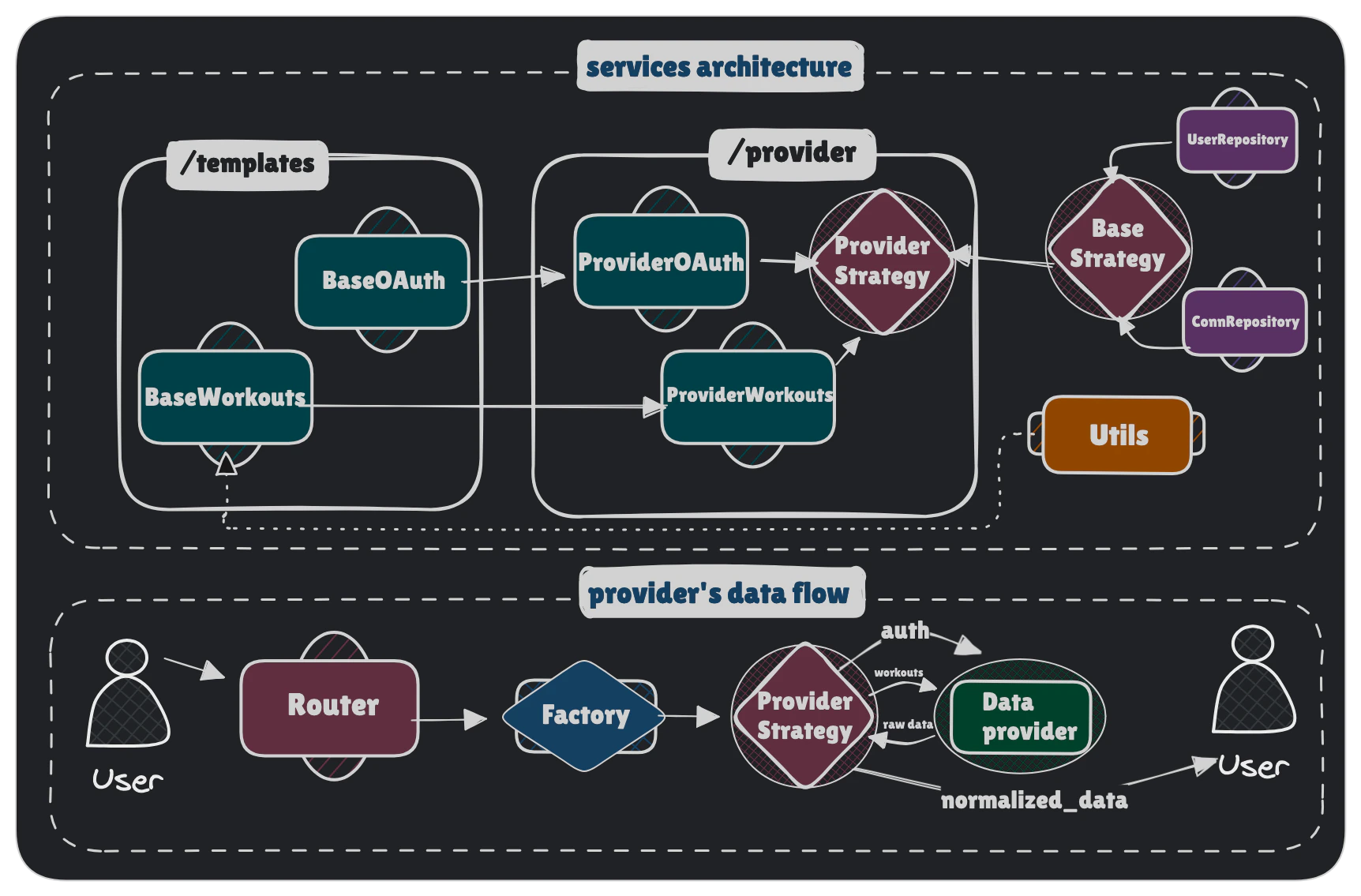
Prerequisites
Before starting, gather the following information about your provider:Provider API Information
Provider API Information
- Base API URL (e.g.
https://cloudapi.suunto.com) - Authentication method (usually OAuth 2.0)
- Available data endpoints (activities, workouts, health metrics)
- Rate limits and pagination
OAuth Configuration (if applicable)
OAuth Configuration (if applicable)
- Authorization URL
- Token exchange URL
- Required scopes
- PKCE required (yes/no)
- Credentials being sent via
Authorizationheader or request body - Client credentials (ID and Secret)
- Where redirect URL should be registered
Data Format
Data Format
- Workout/activity data structure
- Timestamp format (Unix, ISO 8601, etc.)
- Available metrics (heart rate, distance, calories, etc.)
- Workout type mappings
Please, remember to provide
svg icon for a new provider. It should be named <lowercase_provider_name>.svg and be placed in /backend/app/static/provider-icons.Step 1: Create Provider Directory Structure
Create a new directory for your provider inbackend/app/services/providers/.
For a provider named Suunto, create:
Step 2: Implement the Strategy Class
The strategy class is the entry point for your provider. It defines the provider’s identity, declares its capabilities, and initializes its components. Createbackend/app/services/providers/suunto/strategy.py:
Key Points:
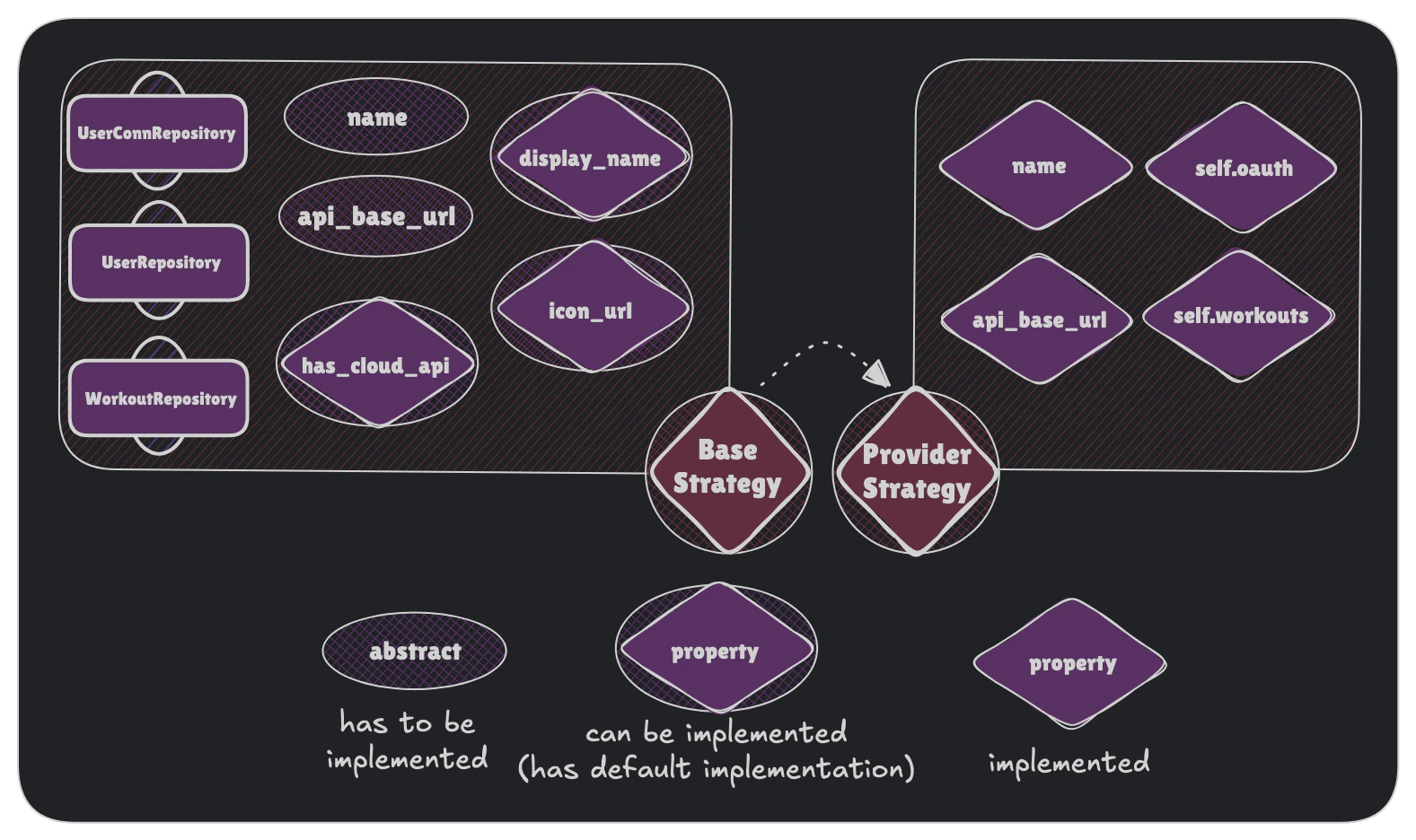
name: Must be unique and lowercase (used in URLs and database)api_base_url: Used by the API client to construct requestsdisplay_name: Optional, shown in UI (defaults toname.capitalize())capabilities: Required — tells the unified router and sync scheduler how this provider delivers datacoverage: declares what data the provider emits; pass through all four constants fromcoverage.py(see below)- Set
self.webhooks = None(default) if your provider has no incoming webhooks - Set
self.oauth = Nonefor SDK/file-upload-only providers like Apple Health
Inherited
BaseProviderStrategy will init all required repositories so you don’t need to take care about database manipulations. You can read more about repositories role in our System Overview.Declare data coverage (coverage.py)
coverage.py is the single source of truth for what your provider emits. It powers the public GET /api/v1/meta/coverage endpoint and the Data Coverage matrix, and the coverage property above reads from it.
Create backend/app/services/providers/suunto/coverage.py:
- Move any
key → SeriesTypemapping that lives indata_247.py/workouts.pyintocoverage.pyand import it back, so the mapping is defined once andTIMESERIESis derived from it. - Single inline
series_type=SeriesType.Xemissions may stay in the handler, butXmust appear inTIMESERIES. - Declare all four constants; use
frozenset()for layers your provider doesn’t emit (e.g. a workouts-only provider has an emptyTIMESERIES).
SeriesType or sets an EventRecordDetail field not declared here — and asserts the strategy’s coverage property exposes all four constants:
Step 3: Implement OAuth Handler (PULL providers)
If your provider uses OAuth 2.0 for authentication, implement the OAuth handler. Createbackend/app/services/providers/suunto/oauth.py:
Here you can also create all provider-specific methods, like
_register_user in Polar’s case.Configuration Options:
use_pkce
Set to
True if provider requires PKCE (Proof Key for Code Exchange). Garmin enforces PKCE, Polar and Suunto don’t.auth_method
BASIC_AUTH: Credentials in Authorization header (Polar, Suunto)BODY: Credentials in request body (Garmin)
Add Environment Variables:
Add your OAuth credentials to.env:
backend/app/config.py:
Step 4: Implement Workouts Handler
The workouts handler fetches and normalizes workout data from the provider’s API. Createbackend/app/services/providers/suunto/workouts.py:
Key Methods to Implement:
1
_normalize_workout()
Most important! Convert provider’s data format to OpenWearables unified schema.
2
_extract_dates()
Handle provider-specific timestamp formats (Unix, ISO 8601, custom strings)
3
_build_metrics()
Creates statistics for Workout.
4
_build_bundles()
Optimize query by bundling workout records into packages.
5
load_data()
Main sync method that orchestrates fetching and saving data
Step 5: Create Workout Type Mapping
Create a mapping file to convert provider-specific workout types to unified types. Createbackend/app/constants/workout_types/suunto.py:
Step 6: Register Provider in Factory
Add your new provider to the factory so it can be instantiated by the system. Editbackend/app/services/providers/factory.py:
Factory will be used by routes endpoints to fetch correct strategy.
Step 7: Add Provider to Schema Enums
Update theProviderName enum to include your new provider.
Edit backend/app/schemas/oauth.py:
- Type validation in API endpoints
- Auto-generated API documentation with provider options
- Enum-based routing
Step 8: Test Your Integration
Now test your implementation with these steps:1. Test OAuth Flow (if applicable)
2. Test Data Sync
3. Verify Database
Check that workouts are saved correctly:4. Check Logs
Monitor logs for errors:Step 9 (Optional): Implement Webhook Handler (PUSH flow)
If your provider delivers data via incoming webhooks, implement aBaseWebhookHandler subclass and wire it into your strategy.
The unified router at POST /api/v1/providers/{provider}/webhooks automatically delegates all requests to strategy.webhooks — no new routes needed.
Understand the delivery mode
First decide how your provider delivers webhook data:Full payload (push)
Provider sends the complete data in the webhook body.
dispatch() saves records directly.
Example: GarminNotify-only
Provider sends a lightweight notification with user ID + event type. You must fetch actual data via REST inside
dispatch().
Example: Oura, Strava, Fitbitcapabilities inside your strategy:
Create the webhook handler
Createbackend/app/services/providers/suunto/webhook_handler.py:
BaseWebhookHandler provides two signature-verification helpers so you never reimplement cryptographic primitives:_verify_hmac_sha256(secret, body, provided_signature)— for HMAC-SHA256 providers (Oura, Fitbit)_verify_token(expected, provided)— for plain shared-secret header/query-param verification
Wire the handler into your strategy
/api/v1/providers/suunto/webhooks will route all POST and GET requests to your handler automatically.
GET /api/v1/providers/{provider}/webhooks → strategy.webhooks.handle_challenge(request)POST /api/v1/providers/{provider}/webhooks → strategy.webhooks.handle(request, body, db)Automatic webhook registration (optional)
Some providers expose an API to register webhook subscriptions programmatically (e.g. Oura). For these, you can have subscriptions registered automatically whenever an admin switches the provider’s live sync mode towebhook — no manual setup in the developer portal required.
To enable this:
- Set
webhook_registration_api=Truein your strategy’sProviderCapabilities. - Implement
register_subscriptions(callback_url)on your webhook service (wired asself.webhook_servicein the strategy) to call your provider’s subscription registration API. It should be idempotent — skip existing subscriptions, create missing ones.
PUT /api/v1/oauth/providers/{provider}, the settings service hands the new mode to strategy.apply_live_sync_mode(mode), which dispatches the reconcile_provider_webhooks Celery task so the request is not blocked on the provider’s API. The task registers on webhook and deletes on pull. The callback URL is derived from API_BASE_URL: {API_BASE_URL}/api/v1/providers/{provider}/webhooks.
Implement deregister_subscriptions() on your webhook service on top of the list/delete methods it already has — that is the pull half, and without it no events stop arriving when an admin switches back to periodic pull. Override apply_live_sync_mode() on the strategy only if reconciliation cannot go through that task at all.
If
webhook_registration_api=False (the default), switching sync mode to webhook only updates the database — you must register subscriptions manually in the provider’s developer portal pointing to {API_BASE_URL}/api/v1/providers/{provider}/webhooks.Per-user subscriptions
Some providers create subscriptions with each user’s own bearer token rather than one app-level registration (Withings). For those, also setwebhook_subscription_per_user=True and:
- Make
register_subscriptions(callback_url)andderegister_subscriptions()dispatch one per-connection task each (UserConnectionRepository.get_all_active_by_provider) instead of subscribing anything themselves, and return no results — nothing is subscribed or deleted there. Thecallback_urlargument is unused; each per-connection task builds its own. - Add that task under
app/integrations/celery/tasks/<provider>/, next togarmin/. It stays provider-scoped rather than shared, so it can call your own service directly instead of forcing a per-user method ontoBaseWebhookService. Give it a singleuser_idargument and have it work against the provider’s currently configured live-sync mode (ProviderSettingsRepository.get_live_sync_mode), listing the provider’s existing subscriptions first and changing only the gap, so a redelivered task is safe and a mode ofpullrevokes rather than creates. - Drive both ends from
BaseOAuthTemplaterather than adding new hooks. Override_save_connectionto enqueue that task after callingsuper()— the connection and its token are committed by then — andderegister_userto revoke, which disconnect, data purge and account deletion all already call while the connection is still active.
status drives the task’s retry policy: error retries with the failures attached, anything else counts as success. Return skipped for what retrying cannot fix, such as an unusable callback URL or a revoked grant.
Because each connection holds its own subscription, both register_subscriptions() and deregister_subscriptions() fan out the same way — the per-connection task reads the configured mode and revokes when it is pull, so neither direction is special-cased in shared code. app/services/providers/withings/webhook_service.py and app/integrations/celery/tasks/withings/notify_sync_task.py are the reference implementation.
Troubleshooting
Data not normalizing correctly
Data not normalizing correctly
Add detailed logging in
_normalize_workout to inspect raw data structure. Compare against provider’s API documentation.Duplicate workouts being created
Duplicate workouts being created
Implement duplicate detection in
_save_workout based on provider_id. Check if workout with same provider_id already exists.Missing workout types
Missing workout types
Add missing types to your mapping file. Consider adding a fallback type (“other”) and logging unmapped types for future updates.
Summary Checklist
Use this checklist to ensure you’ve completed all steps:- Created provider directory structure (
strategy.py,oauth.py,workouts.py) - Implemented
ProviderStrategywith required properties andcapabilitiesdeclaration - Implemented
ProviderOAuthwith endpoints, credentials, and user info fetch - Implemented
ProviderWorkoutswith normalization logic - Implemented
ProviderWebhookHandlerextendingBaseWebhookHandler(ifwebhook_streamorwebhook_ping) - Wired
self.webhooksin strategy (or left asNoneif no webhooks) - Created workout type mapping file
- Registered provider in
ProviderFactory - Added provider to
ProviderNameenum - Added provider icon to static assets
- Added environment variables to
.envandconfig.py - Tested OAuth flow end-to-end
- Tested data synchronization
- Verified data in database
- Tested webhook delivery at
POST /api/v1/providers/{provider}/webhooks(if applicable) - Tested subscription verification at
GET /api/v1/providers/{provider}/webhooks(if applicable) - If
webhook_registration_api=True: implementedregister_subscriptions()andderegister_subscriptions()on the webhook service, and verified both fire on the sync mode switch - If
webhook_subscription_per_user=True: implemented the per-connection reconcile on your webhook service plus its provider-scoped task, overrode_save_connectionandderegister_user, and verified the fan-out reconciles one connection per active link in both directions - Added error handling and logging
- Updated API documentation
Congratulations! You’ve successfully integrated a new provider into OpenWearables. 🎉