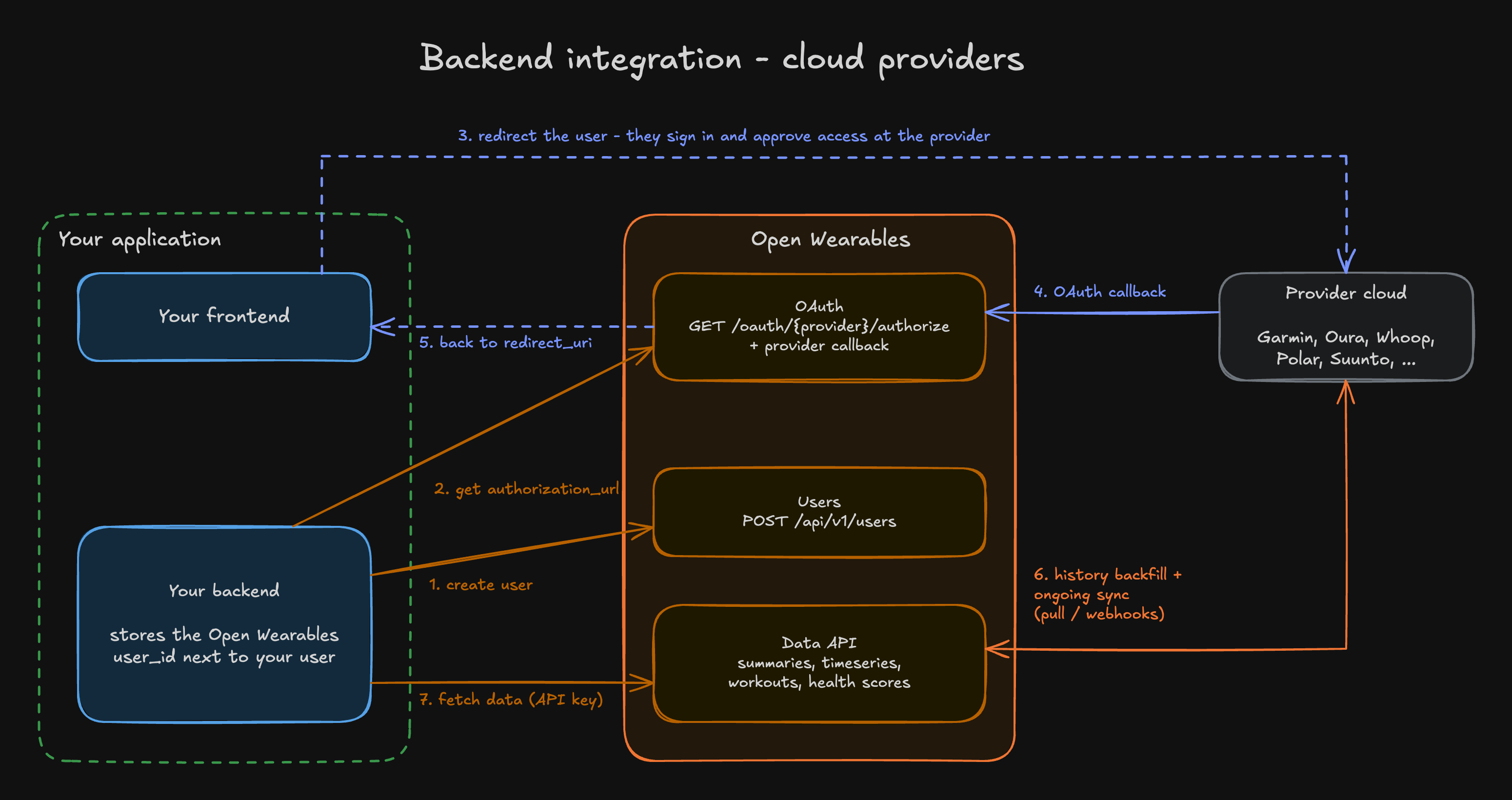
This guide walks you through the complete integration flow with Open Wearables - creating users from your backend, handing users off to wearable providers via OAuth (the frontend redirect dance included), and fetching normalized health data back.

Prerequisites

Before you begin, ensure you have:
  • Open Wearables instance running (self-hosted or cloud)
  • API Key generated from the settings tab in Open Wearables Developer portal
  • Your backend framework ready (examples use Python/FastAPI, but concepts apply to any language)

Environment Variables

Add these to your application’s environment:
OPEN_WEARABLES_API_URL=http://localhost:8000
OPEN_WEARABLES_API_KEY=sk-your-api-key-here

Authentication

All API requests require the X-Open-Wearables-API-Key header. This is not a Bearer token.
curl http://localhost:8000/api/v1/users \
  -H "X-Open-Wearables-API-Key: YOUR_API_KEY"
Common mistake: Using Authorization: Bearer YOUR_API_KEY won’t work. Always use the X-Open-Wearables-API-Key header.

SDK Authentication (Mobile Apps)

If you’re building a mobile app that pushes health data (e.g., Apple Health from iOS), use SDK tokens instead of API keys. SDK tokens are user-scoped JWT tokens that only authorize data push endpoints.
AuthenticationUse Case
API KeyBackend-to-backend integration, fetching data, OAuth flows
SDK TokenMobile apps pushing health data to Open Wearables

Step 1: Create an Application

First, register an application to get app_id and app_secret:
curl -X POST http://localhost:8000/api/v1/applications \
  -H "Authorization: Bearer YOUR_DEVELOPER_JWT" \
  -H "Content-Type: application/json" \
  -d '{"name": "My iOS App"}'
Response:
{
  "id": "550e8400-e29b-41d4-a716-446655440000",
  "app_id": "app_abc123",
  "name": "My iOS App",
  "created_at": "2025-01-15T10:30:00Z",
  "app_secret": "secret_xyz789..."  // Store securely! Only shown once.
}
Store app_secret securely in your backend. It’s only returned once and cannot be retrieved again.

Step 2: Exchange Credentials for User Token

When a user logs into your mobile app, your backend exchanges the app credentials for a user-scoped token:
curl -X POST http://localhost:8000/api/v1/users/{user_id}/token \
  -H "Content-Type: application/json" \
  -d '{
    "app_id": "app_abc123",
    "app_secret": "secret_xyz789..."
  }'
Response:
{
  "access_token": "eyJhbGciOiJIUzI1NiIs...",
  "token_type": "bearer"
}

Step 3: Use Token in Mobile App

The mobile app uses this token to push health data to the SDK sync endpoints:
curl -X POST http://localhost:8000/api/v1/sdk/users/{user_id}/sync/apple/healthion \
  -H "Authorization: Bearer eyJhbGciOiJIUzI1NiIs..." \
  -H "Content-Type: application/json" \
  -d '{ ... health data ... }'
Samsung endpoint is in BETA: The /sync/samsung endpoint is currently under development. It accepts authentication but does not process data yet. The endpoint path may change in future versions. Do not use in production.
SDK tokens are only valid for /sdk/ endpoints. All other API endpoints will return 401 for SDK tokens. Use API keys for those endpoints. The user_id in the URL must match the user the token was issued for.

Integration Flow Overview


Step 1: User Registration

When a user registers in your application, create a corresponding user in Open Wearables.

Create User

All fields in the create-user payload are optional - you can even POST an empty body and get back a valid user.
FieldTypeRequiredNotes
emailstringOptionalMust be a valid email if provided. Not enforced unique - see the note below.
first_namestringOptionalMax 100 characters. Useful for display in the Open Wearables dashboard.
last_namestringOptionalMax 100 characters. Useful for display in the Open Wearables dashboard.
curl -X POST http://localhost:8000/api/v1/users \
  -H "X-Open-Wearables-API-Key: YOUR_API_KEY" \
  -H "Content-Type: application/json" \
  -d '{
    "email": "user@example.com",
    "first_name": "Ada",
    "last_name": "Lovelace"
  }'

Response

{
  "id": "176be8de-8452-4eb7-a7ea-147fec925d9d",
  "email": "user@example.com",
  "first_name": "Ada",
  "last_name": "Lovelace",
  "created_at": "2025-01-15T10:30:00Z"
}
Any field you omit from the request will come back as null.
Store the Open Wearables User ID! You’ll need this ID for all subsequent API calls.

Update Your User Model

Add a field to store the Open Wearables user ID:
from uuid import UUID
from sqlalchemy.orm import Mapped, mapped_column

class User(Base):
    id: Mapped[UUID] = mapped_column(primary_key=True)
    email: Mapped[str]
    open_wearables_user_id: Mapped[UUID | None]  # Add this!
Open Wearables does not enforce uniqueness on email, first_name, or last_name - calling POST /api/v1/users twice with the same email will happily create two separate user records. Your backend is the source of truth for user identity and is responsible for ensuring you only create one Open Wearables user per user in your system (e.g. by storing open_wearables_user_id on your own user row and checking it before creating).
The legacy external_user_id column does still carry a DB-level unique constraint, so sending a duplicate value there will fail with an integrity error. The field is deprecated and no data-fetching endpoint accepts it - do not rely on it for deduplication. Use the pattern above (store the Open Wearables UUID on your side) instead.

Step 2: Connect Wearable Provider

Connect users to their wearable devices via OAuth.

List Available Providers

The list of providers is dynamic - which ones are enabled depends on your instance’s configuration and whether OAuth credentials are set up. Fetch it at runtime rather than hardcoding a list:
curl "http://localhost:8000/api/v1/oauth/providers?enabled_only=true&cloud_only=true" \
  -H "X-Open-Wearables-API-Key: YOUR_API_KEY"
Query parameters:
ParameterDefaultDescription
enabled_onlyfalseReturn only providers enabled in your instance
cloud_onlyfalseReturn only cloud-based (OAuth) providers, excludes SDK-only providers like Apple Health
Response:
[
  {
    "provider": "garmin",
    "name": "Garmin",
    "has_cloud_api": true,
    "is_enabled": true,
    "icon_url": "/static/provider-icons/garmin.svg"
  },
  {
    "provider": "polar",
    "name": "Polar",
    "has_cloud_api": true,
    "is_enabled": true,
    "icon_url": "/static/provider-icons/polar.svg"
  }
]
icon_url is a relative path. To render the provider icon, prepend your API base URL: {OPEN_WEARABLES_API_URL}{icon_url}.

Get Authorization URL

Provider names must be lowercase: garmin, polar, suunto
curl "http://localhost:8000/api/v1/oauth/garmin/authorize?user_id=176be8de-8452-4eb7-a7ea-147fec925d9d" \
  -H "X-Open-Wearables-API-Key: YOUR_API_KEY"

Response

{
  "authorization_url": "https://connect.garmin.com/oauthConfirm?oauth_token=...",
  "state": "abc123..."
}

Frontend Integration Flow

1

User clicks 'Connect Garmin'

Your frontend initiates the connection flow.
2

Your backend calls the authorize endpoint

Request the authorization URL from Open Wearables.
3

Redirect user to authorization_url

The user authenticates with their wearable provider.
4

Provider redirects to Open Wearables callback

Open Wearables handles the OAuth callback automatically.
5

Open Wearables redirects to your app

Configure a redirect_uri parameter to return users to your app.

Custom Redirect URI

To redirect users back to your app after OAuth:
curl "http://localhost:8000/api/v1/oauth/garmin/authorize?user_id=USER_ID&redirect_uri=https://yourapp.com/oauth/callback" \
  -H "X-Open-Wearables-API-Key: YOUR_API_KEY"

Check Connection Status

Verify a user’s connected providers:
curl "http://localhost:8000/api/v1/users/176be8de-8452-4eb7-a7ea-147fec925d9d/connections" \
  -H "X-Open-Wearables-API-Key: YOUR_API_KEY"

Response

[
  {
    "id": "a1b2c3d4-...",
    "user_id": "176be8de-8452-4eb7-a7ea-147fec925d9d",
    "provider": "garmin",
    "status": "active",
    "provider_user_id": "12345678",
    "created_at": "2025-01-15T10:30:00Z",
    "updated_at": "2025-01-15T10:30:00Z",
    "last_synced_at": null
  }
]

Step 3: Historical Backfill (Automatic)

You do not need to explicitly trigger a sync after OAuth completes. On the first successful provider connection, Open Wearables automatically dispatches a historical backfill:
  • Up to 90 days for pull-based providers (Polar, Suunto)
  • Up to 30 days for Garmin (webhook-based backfill capped at 30 days from the user’s consent date - further back is not retrievable)
This behaviour is controlled by the HISTORICAL_SYNC_ON_CONNECT flag (default: true). It’s a grace-period flag introduced in v0.4.3 - the default will flip to false in a future release and the flag will eventually be removed. Once you’re ready to control historical backfill yourself, set HISTORICAL_SYNC_ON_CONNECT=false and call POST /api/v1/providers/{provider}/users/{user_id}/sync/historical explicitly. See PR #897 for background.
Ongoing sync after the initial backfill happens automatically - webhooks push updates for providers that support them, and pull-based providers are polled on a schedule. Your integration only needs to connect the user; fetching data (next step) is the read side.

Step 4: Retrieve Health Data

All data endpoints require the X-Open-Wearables-API-Key header and return a PaginatedResponse wrapper:
{
  "data": [ /* items */ ],
  "pagination": {
    "next_cursor": "eyJpZCI6...",
    "previous_cursor": null,
    "has_more": true,
    "total_count": 150
  },
  "metadata": {
    "resolution": null,
    "sample_count": 50,
    "start_time": "2025-01-01T00:00:00Z",
    "end_time": "2025-01-31T23:59:59Z"
  }
}
To page through results, pass cursor=<next_cursor> until has_more is false. The health-scores endpoint uses offset/limit instead of a cursor but returns the same envelope.

Activity summary

Daily aggregates: steps, distance, floors, active/total kcal, active/sedentary minutes, intensity minutes, heart-rate stats.

Sleep summary

Daily sleep: duration, efficiency, stages (awake/light/deep/rem minutes), interruptions, naps, avg HR/HRV/SpO2.

Body summary

Point-in-time body metrics grouped into slow_changing (weight, height, BMI, body fat), averaged (resting HR, HRV over 1-7 days) and latest (temperature, blood pressure within a recency window).

Timeseries

Granular samples for any SeriesType (heart rate, steps, SpO2, etc.) with optional resolution bucketing (raw, 1min, 5min, 15min, 1hour).

Workouts

Workout sessions with type, duration, calories, distance, avg/max heart rate, pace, elevation gain, and source provider metadata.

Health scores

Provider-computed scores (sleep, recovery, readiness, stress, body battery, strain) with optional components breakdown. Filter by category or provider.

Response Shapes

{
  "date": "2025-01-15",
  "source": { "provider": "apple_health", "device": "Apple Watch Series 9" },
  "steps": 8432,
  "distance_meters": 6240.5,
  "floors_climbed": 12,
  "elevation_meters": 36.0,
  "active_calories_kcal": 342.5,
  "total_calories_kcal": 2150.0,
  "active_minutes": 60,
  "sedentary_minutes": 480,
  "intensity_minutes": { "light": 20, "moderate": 30, "vigorous": 10 },
  "heart_rate": { "avg_bpm": 72, "max_bpm": 155, "min_bpm": 58 }
}
Every field apart from date and source is nullable.

Complete Integration Example

Here’s a complete Python client class for Open Wearables integration:
import httpx
from typing import Literal

class OpenWearablesClient:
    def __init__(self, base_url: str, api_key: str):
        self.base_url = base_url
        self.headers = {"X-Open-Wearables-API-Key": api_key}

    async def get_or_create_user(self, local_user) -> dict:
        """Create an Open Wearables user if we haven't already, otherwise reuse the stored ID.

        `local_user` is your own user row - it stores `open_wearables_user_id` once set
        so we never create a second Open Wearables user for the same person.
        """
        async with httpx.AsyncClient() as client:
            if local_user.open_wearables_user_id:
                resp = await client.get(
                    f"{self.base_url}/api/v1/users/{local_user.open_wearables_user_id}",
                    headers=self.headers,
                )
                if resp.status_code == 200:
                    return resp.json()

            resp = await client.post(
                f"{self.base_url}/api/v1/users",
                headers=self.headers,
                json={"email": local_user.email},
            )
            user = resp.json()
            local_user.open_wearables_user_id = user["id"]  # persist on your side
            return user

    async def get_auth_url(
        self,
        provider: Literal["garmin", "polar", "suunto"],
        user_id: str,
        redirect_uri: str | None = None,
    ) -> str:
        """Get OAuth authorization URL."""
        params = {"user_id": user_id}
        if redirect_uri:
            params["redirect_uri"] = redirect_uri

        async with httpx.AsyncClient() as client:
            resp = await client.get(
                f"{self.base_url}/api/v1/oauth/{provider}/authorize",
                headers=self.headers,
                params=params,
            )
            return resp.json()["authorization_url"]

    async def get_connections(self, user_id: str) -> list[dict]:
        """Get user's connected providers."""
        async with httpx.AsyncClient() as client:
            resp = await client.get(
                f"{self.base_url}/api/v1/users/{user_id}/connections",
                headers=self.headers,
            )
            return resp.json()

    async def _paginated(self, path: str, params: dict) -> list[dict]:
        """Walk `next_cursor` until `has_more` is false and return all items."""
        items: list[dict] = []
        async with httpx.AsyncClient() as client:
            while True:
                resp = await client.get(f"{self.base_url}{path}", headers=self.headers, params=params)
                payload = resp.json()
                items.extend(payload.get("data", []))
                cursor = payload["pagination"].get("next_cursor")
                if not payload["pagination"].get("has_more") or not cursor:
                    return items
                params = {**params, "cursor": cursor}

    async def get_activity_summary(self, user_id: str, start_date: str, end_date: str) -> list[dict]:
        return await self._paginated(
            f"/api/v1/users/{user_id}/summaries/activity",
            {"start_date": start_date, "end_date": end_date},
        )

    async def get_sleep_summary(self, user_id: str, start_date: str, end_date: str) -> list[dict]:
        return await self._paginated(
            f"/api/v1/users/{user_id}/summaries/sleep",
            {"start_date": start_date, "end_date": end_date},
        )

    async def get_body_summary(self, user_id: str) -> dict | None:
        """BodySummary is a single object (not paginated). Returns None if no data."""
        async with httpx.AsyncClient() as client:
            resp = await client.get(
                f"{self.base_url}/api/v1/users/{user_id}/summaries/body",
                headers=self.headers,
            )
            return resp.json()

    async def get_timeseries(
        self,
        user_id: str,
        start_time: str,
        end_time: str,
        types: list[str],
        resolution: Literal["raw", "1min", "5min", "15min", "1hour"] = "raw",
    ) -> list[dict]:
        return await self._paginated(
            f"/api/v1/users/{user_id}/timeseries",
            {"start_time": start_time, "end_time": end_time, "types": types, "resolution": resolution},
        )

    async def get_workouts(self, user_id: str, start_date: str, end_date: str) -> list[dict]:
        return await self._paginated(
            f"/api/v1/users/{user_id}/events/workouts",
            {"start_date": start_date, "end_date": end_date},
        )

    async def get_health_scores(
        self,
        user_id: str,
        category: str | None = None,
        provider: str | None = None,
    ) -> list[dict]:
        """Health scores use offset/limit pagination, not cursors."""
        params = {k: v for k, v in {"category": category, "provider": provider}.items() if v}
        items: list[dict] = []
        offset = 0
        async with httpx.AsyncClient() as client:
            while True:
                resp = await client.get(
                    f"{self.base_url}/api/v1/users/{user_id}/health-scores",
                    headers=self.headers,
                    params={**params, "limit": 200, "offset": offset},
                )
                payload = resp.json()
                data = payload.get("data", [])
                items.extend(data)
                if not payload["pagination"].get("has_more") or not data:
                    return items
                offset += len(data)


# Usage example
async def main():
    client = OpenWearablesClient(
        base_url="http://localhost:8000",
        api_key="sk-your-api-key",
    )

    # 1. Create or get user (pass your own user row; see get_or_create_user above)
    user = await client.get_or_create_user(local_user)
    user_id = user["id"]

    # 2. Get OAuth URL for Garmin
    auth_url = await client.get_auth_url(
        provider="garmin",
        user_id=user_id,
        redirect_uri="https://myapp.com/callback",
    )
    print(f"Redirect user to: {auth_url}")

    # 3. After OAuth callback, confirm the connection is active.
    # Historical backfill is dispatched automatically - no explicit sync call needed.
    connections = await client.get_connections(user_id)
    garmin_connected = any(
        c["provider"] == "garmin" and c["status"] == "active"
        for c in connections
    )

    if garmin_connected:
        # 4. Fetch whatever you need.
        workouts = await client.get_workouts(user_id, "2025-01-01", "2025-01-31")
        activity = await client.get_activity_summary(user_id, "2025-01-01", "2025-01-31")
        scores = await client.get_health_scores(user_id, category="sleep")
        print(f"{len(workouts)} workouts, {len(activity)} activity days, {len(scores)} sleep scores")

Troubleshooting

If your app runs in Docker and Open Wearables runs on the host machine:
docker-compose.yml
services:
  app:
    extra_hosts:
      - "host.docker.internal:host-gateway"
    environment:
      - OPEN_WEARABLES_API_URL=http://host.docker.internal:8000
Ensure you’re using the correct header format:
# ✅ Correct
-H "X-Open-Wearables-API-Key: YOUR_API_KEY"

# ❌ Wrong
-H "Authorization: Bearer YOUR_API_KEY"
email has no unique constraint in Open Wearables - calling POST /api/v1/users twice with the same email will create two separate records. Your backend is the source of truth for user identity, so store the Open Wearables id (UUID) on your own user row the first time you create it, and reuse that ID for every subsequent call:
if not local_user.open_wearables_user_id:
    resp = await client.post("/api/v1/users", json={"email": local_user.email})
    local_user.open_wearables_user_id = resp.json()["id"]
    # persist local_user
The legacy external_user_id field is still DB-unique, but it is deprecated and no data-fetching endpoint accepts it - don’t use it for deduplication.
Historical backfill is dispatched asynchronously on connect and can take anywhere from seconds to several minutes depending on the provider and the amount of history. Poll GET /api/v1/users/{user_id}/connections - last_synced_at flips from null to a timestamp once the first sync finishes. For Garmin’s async export, full history can take hours.If HISTORICAL_SYNC_ON_CONNECT=false in your instance, no backfill runs automatically - call POST /api/v1/providers/{provider}/users/{user_id}/sync/historical yourself.
start_time, end_time, and types are all required. types is repeated:
?start_time=2025-01-15T00:00:00Z&end_time=2025-01-15T23:59:59Z&types=heart_rate&types=steps
Also verify the SeriesType you’re requesting exists for this user - check GET /api/v1/users/{user_id}/summaries/data for a breakdown of what’s been ingested.
Pass the redirect_uri parameter when getting the authorization URL:
/api/v1/oauth/garmin/authorize?user_id=...&redirect_uri=https://myapp.com/callback

Next Steps

API Reference

Complete API documentation with all endpoints.

Provider Setup

Configure OAuth credentials for each provider.

Data Model

Understand the unified health data model.

GitHub

View source code and contribute.